New in CareerHound Pro: Automatic Follow-Up Nudges for Stale Job Applications
When we launched CareerHound Pro, it came with reminders you could set on any job you track. They work great, as long as you remember to set one. But the job applications that slip through the cracks are usually the ones you forgot about entirely. So we built something that doesn't rely on you remembering: automatic follow-up nudges.
What is a follow-up nudge?
A nudge is a reminder CareerHound creates for you. Once a day, it looks at every job in your job tracker and checks how long each one has been sitting in the same status. If an application has gone quiet for longer than your follow-up window, you'll see a reminder on your dashboard like:
No response from Acme Corp in 12 days — follow up?
It shows up in the same dashboard popup and reminder banner as the reminders you set yourself, with a link straight to the job and a button to dismiss it once you've sent your follow-up.
How nudges work
- Only jobs that are waiting on someone else. Nudges apply to jobs in Applied, Awaiting Results, or Interviewing. Jobs you haven't applied to yet, or that are already closed out, are left alone.
- The clock resets when things move. Update a job's status (say, from Applied to Interviewing) and its timer starts over. If it goes quiet again, you'll get a fresh nudge.
- One nudge per quiet stretch. You won't get nagged about the same job every day. Once a job has been nudged, it stays quiet until its status changes.
- Your own reminders come first. If you've already set a reminder on a job that you haven't dismissed yet, CareerHound won't overwrite it with a nudge.
Choosing your follow-up window
By default, CareerHound nudges you after 10 days without a status change. That's a reasonable starting point for most job searches, but you can change it to anything from 1 to 90 days:
- Sign in and click Settings in the sidebar.
- Under Auto follow-up nudges, enter the number of days you want to wait.
- Click Save.
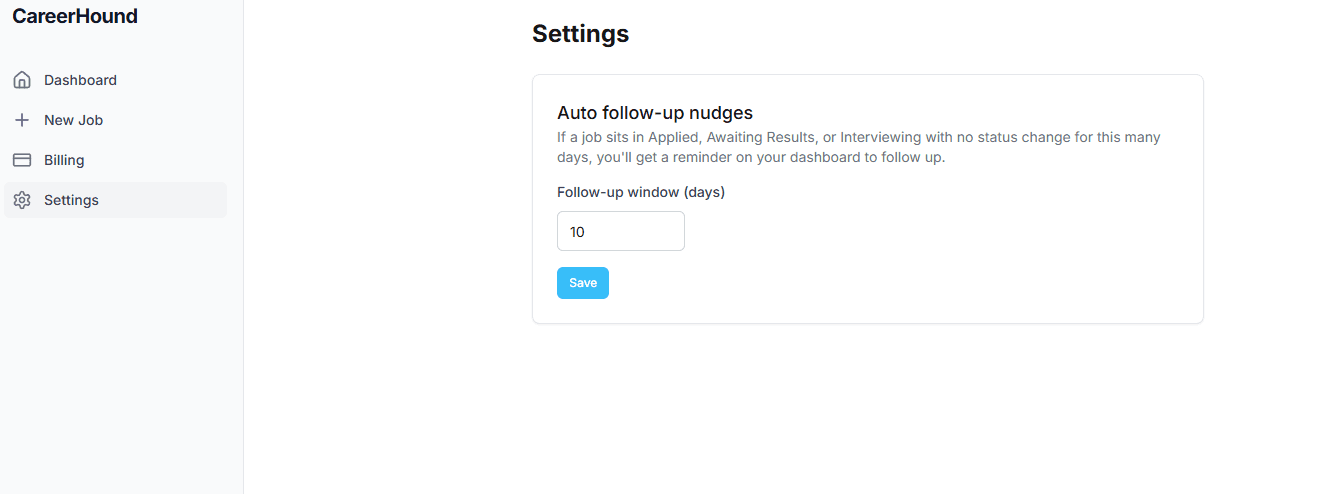
The window applies to all of your tracked jobs. A shorter window (5–7 days) suits fast-moving roles or a very active job search; a longer one (14+ days) works better if you're applying to companies known for slow hiring processes.
Nudges vs. reminders
Both are part of CareerHound Pro, and they work together. Use a reminder when you know exactly when you want to follow up, like "check in the Monday after my interview." You set it from the Reminder panel on any job's detail page, down to the date and time. Let nudges handle everything else: the applications you sent and forgot about, the interviews where nobody got back to you. Between the two, nothing in your job search goes quiet without you knowing about it.
Available now on CareerHound Pro
Auto follow-up nudges are included in CareerHound Pro at $5.99/month, along with manual reminders and everything in the free job tracker. If you're already on Pro, nudges are turned on for you with the 10-day default. Head to Settings any time to adjust it.